Products PathAway Outdoor Navigator on Android


PathAway Outdoor Navigator
for Android Smartphones and Tablets
GPS Navigation, Tracking, Route Planning, Mapping
All purchases and upgrades are done from in-app purchasing.
-
Available Upgrades
- Use GPS to navigate
- Route Planning and mapping
- Define or import routes to follow
- Define or import favourite points to find
- Record track log to find your way home later.
- Download Free Online Maps that are saved on the device
- Access downloaded maps without a data connection
- Animated Weather Forecast Overlays
- All features of LE
- Use GPS to navigate
- Route Planning and mapping
- Define or import routes to follow
- Define or import favourite points to find
- Record track log to find your way home later.
- Use Custom Maps or Download Online Maps
- Access downloaded maps without a data connection
- Animated Weather Forecast Overlays
- All features of Express
- Fully Customizable
- Location Sharing
- Elevation Profiles
- Use Custom Maps or Download Online Maps
- Advanced Data Management
LE (Basic App)
Express Upgrade
PRO Upgrade
- Languages: English, German, Italian, Spanish, French, Swedish, Czech, Portuguese
- Android 4.4 or higher
-
Refer PathAway to your Friends
earn rBux rewards
|
PathAway is the all-purpose GPS Navigation software. PathAway provides affordable navigational, tracking, and mapping support for aviation, boating, hiking, cycling, touring, rally racing, motorcycle touring, ballooning, scuba diving, fishing, hunting, paragliding, mountain climbing, ultra-light flying, canoeing, snowmobiling, athletic training, outdoor education, geocaching, mapping/GIS, mining, military training, surveying, site inspection, telematics, field data collection, security, search and rescue or any application where location is important. If you get out and go places, PathAway is the companion to take with you. PathAway software has evolved from real customer usage over that past 14 years. The Android version represents the culmination of our experience building world-class software trusted by the most demanding users.
GPS Navigation
WebMaps - Download Internet maps on-the-fly
Web Maps allows you to download maps on-the-fly from
a Map Server on the internet. Maps will be downloaded
in the background and displayed on the screen as they
complete downloading. Maps are cached, so downloading
only needs to be done once. Cached maps are always available even when there is no data connection.
OpenCycleMap.com: User contributed topographic and terrain maps. Covers most of World ArcGIS World and USA Topos: Free Topographic maps provided by ArcGIS Natural Resources Canada Topos: Free Topographic maps provided by NR Canada FAA USA Sectional Charts: USA and South Ontario Aeronautical charts provided by the FAA. NOAA USA Nautical Charts: USA coastal Navigational Raster charts.
Intelligent Moving Map Display
Coordinate Grids:
Personal Points of Interest/Waypoints
Record and Follow your Tracks
Point to Point Routing
Navigation Warnings and Alarms
Compass View
Import/Export Data Formats
GPS fix acquired and lost alarms
Onscreen Trip Statistics on a Customizable Dashboard
Animated Weather Forecast Overlays
PathAway Express and PRO
Maps from Anywhere
BSB/KAP Charts Direct Display: Conversion is not required for BSB Maps. Simply import them to your PathAway data folder and PathAway will use them directly. PathAway PRO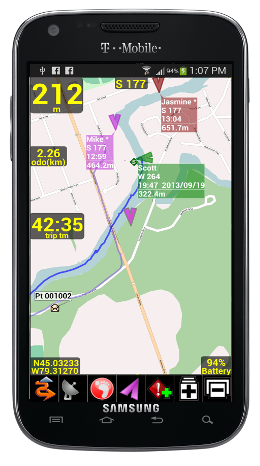
PathAway PRO Edition has all of the features of Express Edition plus new features targeted towards power users and professionals. Of significance, PathAway PRO has 2-way location sharing. See where others are right from your handheld, share your location with others. Also, with PathAway PRO, you can view your route or track on the Profile View Screen to see your location and speed on an elevation profile map. Location SharingPathAway FindMe offers a simple online service where your can share your location. After posting your location to the PathAway FindMe service, go to http://pathaway.com/findme to view the last location on a Google map. Send My Location: (Internet connection required)Send current GPS location to another user over the internet. Send manually via command, or have location sent automatically based on the following frequency intervals:
Retrieve Shared Locations (Internet connection required)As new locations are retrieved, they are assigned a default background color for display on the map. This color can be modified by Editing the Locations Shared Item Info. The Label for a location can be modified by the user for easier on-screen identification. Retrieval is achieved via automatic or manual polling of our secure Https-based Tracking server. On-Map Locations Labels:- For each location being tracked, the tag on the map can display current location and heading of location, course, speed, elevation of user, date/time of retrieval, distance to, course to, and elevation difference. PRO Upgrade
|
||||||||||||
Features
PathAway navigation system uses satellite signals to determine your exact location, speed and direction of travel. PathAway uses the built-in internal GPS of the Android devices.
GPS is not required to use the software. You can still browse maps, create routes, and mark points on the map in offline mode.
Navigation
- GPS support for devices with internal GPS receivers.
- Internal
compass utlized when stationary or travelling very slowly.
- Customizable screens can display current location, elevation,
speed, direction, plus navigational information such as distance,time,
and direction to destination. Over 30 different display options
available.
- Moving map centers on your current location.
- Record your track for later back-tracking, or reviewing
the journey.
- Proximity notification displays points you are approaching,
their distance away, and position relative to your direction
of travel.
- Big Compass screen can show your most important information
at a glance. Customize the Compass to suit your needs.
Create your own Maps for Navigation
- Prepare your own maps for use in PathAway, using the free Map Manager application. Scan your paper maps or get digital maps from CD ROM software, or web sites. -
BSB/KAP Charts Direct Display: Conversion is not required for BSB Maps. Simply import them to your PathAway data folder and PathAway will use them directly.
- Map Files are arranged in layers so you can zoom in and out of different resolutions of maps. Even set PathAway to automatically switch to the highest resolution map as you travel.
- Scroll by dragging map with the stylus.
- Maps are highly optimized and compressed for efficient use on memory limited devices. They can be any size and resolution that fits within your device memory.
WebMaps
- Use online maps from OpenStreetMap, OpenCycleMap, Google, USGS Topos, ArcGIS World and USA Topos, Natural Resources Canada Topos,
FAA USA/South Ontario Aviation Charts
- Maps are downloaded on-the-fly as you travel, or choose an area to download.
- Maps are cached on the device for off-line use when there is no data connection
Points
- Capture and mark unlimited number of points and locations.- Use long names and descriptions for easy recognition.
- Apply an icon to each point.
- Capture pictures or videos to attach to your points.
- Goto points on the map, or points along a track.
Routes
- Create routes by simply clicking points on a map, or by
adding points from your Points database.
- Choose a recorded track to follow.
- Follow routes either forward or reverse (back-track). Great
for finding your way home.
- Simulate (play) your route travel before you go.
- Determine your total distance and estimated travel time
to destination. Time can be estimated by current speed, average
speed, or a custom speed setting.
Tracks
- PathAway can record your location at regular intervals
as you travel with a GPS.
- The track line is displayed on the map as you travel.
- You can then reuse the track to follow at a later time.
- Time and distance are recorded in the track log, useful
for accurate travel planning.
Screen Views
Full Screen Map View - Utilizes most of the screen to show as large a map area as possible. Long/Lat, speed, elevation, and direction of travel are displayed. This data is the “navigation” data in the program.
Tracking View - Shows the map and navigation data. Default travel stats are related to information specific to your current trip.
Route View - Shows the map and “navigation” data, plus full info for point proximity. As you approach a point, “Estimated time to next destination (ete)”, “Distance to” and “Course to” are displayed.
Compass View - Shows the navigation Compass and selected “navigation” data.
The Compass view is customizable. The screen can display data in a “Tiled” format, or a single Compass in full screen.
Weather View - Shows a control bar for selecting weather type, playing time forecast animation, and controlling transparency of the weather overlay over your map.
User Interface
- Preferences for distance and elevation units, course display,
time estimation, proximity notification, map display detail,
and track recording precision.
- Customizable on-screen Dashboard surrounds the map view. Modify any of the 12 edges of the screen to pop-out
to show desired trip info.
In-Hand Data Management
- Edit point, route, and track databases
- Import and Export between GPX, LOC, KML, and text delimited formats.
PRO Edition Only
Location Sharing
PathAway FindMe offers a simple online service where your can share your location. After posting your location to the PathAway FindMe service, go to http://pathaway.com/findme to view the last location on a Google map. PathAway also supports the most common GPS Tracker protocols. Http location posting can be configured to send to a tracking service of your choice.
Send My Location: (Internet connection required)
Send current GPS location to another user via secure Https protocol. Send manually via command, or have location sent automatically based on time or distance intervals:
Retrieve Shared Locations (Internet connection required)
As new Locations are retrieved, they are displayed on the map with optional detils such as heading, course, speed, elevation of location, date/time of retrieval, distance to, course to, and elevation difference. Included are options foe cycling through to view the location of each shared location. Retrieval is achieved either via automatic or manual polling.
Profile View
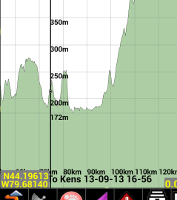
Elevation and Speed Profile view for tracks and routes. View and follow your route based on elevation stored in the route data. Analyze your track log speed and elevation.
Show Multiple Tracks/Routes on Map
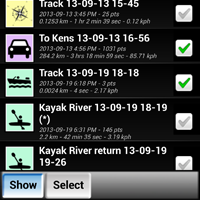
With Pro you can select multiple tracks or routes to display on the map at the same time. If you have recorded many tracks, or you've imported multiple routes then now these can be visible on the map at the same time. The Routes and Tracks dialog's "Show" option, enables you to select which data to show on the map.
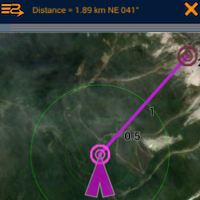
Measure Area or the distance between points
With the Measure tool you can just click 2 points to get the distance and direction. You can also determine the area coverage of one of your routes, or recorded track logs.
Multiple Folders support for Maps
For those with a large number of Maps to manage. PathAway PRO allows the selection of any folder on the internal or external sdcard to be used for storing and retrieving maps.
Custom User Interface Colors and Styles
Modify color and width of the tracks, routes, and other lines displayed on the screen. Modify the dashboard colors, and other UI elements. Choose from 3 different position markers and adjust their size and color. On all items, you can also define the level of transparency in order to not clutter the map.
Directional Alarms
In addition to the off-track and altitude warnings, turn instructions, and proximity notifications, PRO now offers different alarm sounds for left and right turns, left and right of off-track warning, and high and low elevation warnings.
Find Location by Street Address Lookup: (Internet connectivity required)
Enter a street address, then choose from the closest points found. Choose whether to show the point on the map, add a new point, or navigate to the address location.
Time and Distance Radials
Display radials around the map center location showing distances or estimated time to surrounding areas.
Customize Alarm sounds
Modify each different type of alarm sound to suit your preferences.
Improve Accuracy of captured Points.
Improve the accuracy of a captured point using the "PinPoint" feature. PinPoint will take multiple samples of the same location to "average" a more precise position.
Map Calibrate and adjustments on the device.
Adjust your custom map calibration using nudge controls, or by adjusting the location of the known points on the map.
Add Turn Instructions to Routes
Insert turn or en route instructions along a route to offer added route guidance. Special alarms will sound for each turn instruction approaching and reached.
Follow Routes in Sequence
This feature will force the system to target the next route point ONLY after you've reached the current point. You can even set it to manual route advance, where you must select the Advance command before the system will move on to the next point.
Other Advanced Settings
- Adjust Settings to show/hide Line to Next Point, Line to Next Turn, Circle Next point and turn.
- Adjust how time estimates are determined. Ie. Based on Active route, current speed, average speed, activity preset speed, or custom speed.
- Adjust Off-Track warning threshold, for route width, and elevation.
- Adjust closest point in-proximity radius
- Adjust Point naming prefixes
- Adjust zoom level where icons and text labels start to display.
- Primary and Secondary Coordinate display. View multiple coordinate types (Ie. lat/long and UTM) on your dashboard at the same time.
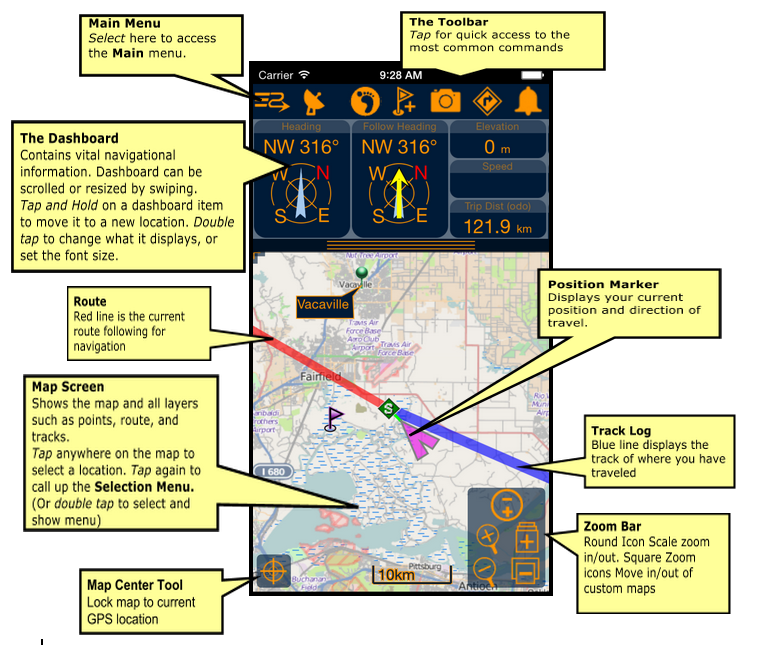
PathAway Main Screen Components
PathAway Reviews
Warning: include(reviews.php): Failed to open stream: No such file or directory in /home/cztnny58/public_html/PWAndroid.php on line 730
Warning: include(): Failed opening 'reviews.php' for inclusion (include_path='.:/opt/alt/php83/usr/share/pear:/opt/alt/php83/usr/share/php:/usr/share/pear:/usr/share/php') in /home/cztnny58/public_html/PWAndroid.php on line 730